



6:45 AM. The restaurant kitchen is dead silent.
Chef Marcus walks through the same routine he’s done for 15 years.
He doesn’t head to the stove.
Doesn’t check reservations.
Doesn’t think about tonight’s special.
He goes straight to his station and starts arranging small bowls.
Shallots, minced. Garlic, sliced paper-thin. Herbs, chopped and separated. Stocks, measured and ready.
Every ingredient he’ll need for the next 8 hours, prepped and positioned within arm’s reach.
His sous chef once asked why he bothered. “You’ve cooked these dishes a thousand times. Why not just grab stuff as you need it?”
Marcus didn’t look up. “Because when the tickets start flying at 7:30, I don’t have time to think. I need to move. And you can’t move fast when you’re searching for what you need.”
The French call it mise en place. “Everything in its place.”
It’s the reason a chef can handle 200 covers in a night without a single plate going out wrong.
It’s also the reason your sales calls keep ending with “let me think about it.”
Not because you can’t cook.
Because your ingredients aren’t ready when the heat turns up.
This afternoon we talked about the prospect who showed up but wasn’t ready.
If you ran the audit prompt, you saw exactly what that’s costing you.
Now here’s how to fix it.
With an automation you build once… and never think about again.
Tonight I’m sharing how to build the Prep-Accountability Sequence as a set-it-and-forget-it system that runs automatically for every booking;
The trigger that kicks off the sequence the moment someone books
The timing logic that adjusts based on how far out they scheduled
The personalization variables that make automated messages feel human
The edge case handling for same-day bookings, reschedules, and cancellations
Let’s build your pre-call automation...
4️⃣ Steps to Build Your Automated Prep Sequence
Most coaches either send nothing between booking and call, or they try to manually message every prospect and burn out in a week.
The fix isn’t more hustle. It’s better systems.
Here’s how to build an automation that handles this for you:
🔵 STEP 1: SET YOUR TRIGGER
Every automation starts with a trigger — the event that kicks off the sequence.
Your trigger: New booking confirmed.
When someone books a call through Calendly, Acuity, TidyCal, or whatever you use, that booking event starts the automation.
How to connect it:
If you’re using ManyChat:
Go to Settings → Integrations → Connect your scheduling tool
Create a new Flow triggered by “Calendly Booking” (or your tool)
The flow starts the moment the booking is confirmed
If you’re using GoHighLevel:
Create a new Workflow
Trigger: “Appointment Booked”
Select your calendar
If you’re using Zapier:
New Zap → Trigger: Calendly “Invitee Created”
Connect to your messaging tool (email, SMS platform, etc.)
The data you’ll capture:
{{first_name}} — Their name
{{call_date}} — When the call is scheduled
{{call_time}} — What time
{{days_until_call}} — How far out they booked (you’ll need this for timing)
🔵 STEP 2: BUILD YOUR TIMING LOGIC
The sequence has 4 touch-points. But the timing changes based on how far out they booked.
The standard timing (5-7 day gap):
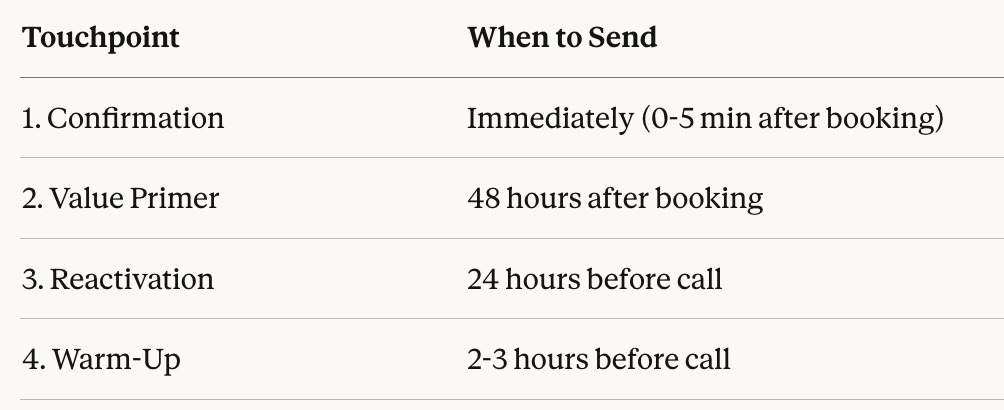
For short gaps (1-2 days):
Skip the Value Primer OR combine it with Confirmation
Send Reactivation the evening before
Keep the Warm-Up
How to set this up:
In ManyChat:
Use “Smart Delay” nodes between messages
Touchpoint 1 → Smart Delay (48 hours) → Touchpoint 2
Use “Wait until specific time” for day-before and day-of
In GoHighLevel:
Use “Wait” steps with time delays
Use “Wait until event” for date-based triggers (24 hrs before appointment)
Edge case handling:
Add a condition: IF days_until_call < 2, skip Touchpoint 2
Add a stop trigger: IF appointment cancelled, exit workflow
🔵 STEP 3: WRITE YOUR MESSAGES WITH VARIABLES
Here’s where most automations feel robotic. They use variables for the name but nothing else.
Your messages need strategic personalization — not just “Hey {{first_name}}!”
Touchpoint 1 — Immediate Confirmation:
Hey {{first_name}}! Just saw your booking come through — {{call_date}} at {{call_time}} works great.

Quick thing before then: I saw you mentioned [PAIN POINT FROM BOOKING FORM]. I want to make sure we use our time well, so I'm sending something tomorrow that'll help you get clear on exactly what you need.

Talk soon.
Touchpoint 2 — Value Primer (48 hrs after booking):
Hey {{first_name}} — wanted to send this before our call.

To make sure we make the most of our time, take 2 minutes to think through these:

1. What's the #1 thing not working right now with [THEIR PROBLEM]?
2. If we solved that, what would be different 90 days from now?
3. What have you already tried that didn't work?

You don't need to send me answers — just have them in mind when we talk.
Touchpoint 3 — Day-Before Reactivation:
Hey {{first_name}} — we're on for tomorrow at {{call_time}}.

I was re-reading what you shared when you booked, and this jumped out: "[THEIR WORDS FROM BOOKING FORM]"

That's what I want to make sure we solve. Come ready to talk about where you want to be in 90 days — I've got some ideas for you.

See you tomorrow.
Touchpoint 4 — Day-Of Warm-Up:
Hey {{first_name}} — looking forward to our call at {{call_time}}. Did those questions I sent spark anything? Either way, we'll figure it out together. See you soon.Pro tip: Add a question to your booking form that captures their pain point in their own words. Then pull that into Touchpoint 1 and 3 as a variable. Now your “automated” messages quote their exact language back to them.
🔵 STEP 4: TEST AND GO LIVE
Before you turn this on for real prospects:
Testing checklist:
☐ Book a fake appointment using your own email/phone
☐ Verify Touchpoint 1 sends within 5 minutes
☐ Check all variables populate correctly (no blank {{first_name}} disasters)
☐ Confirm timing delays work as expected
☐ Test a same-day booking to make sure edge case logic fires
☐ Cancel the fake appointment and verify the sequence stops
Go-live checklist:
☐ Turn off any old confirmation automations (avoid duplicate messages)
☐ Update your booking confirmation page to set expectations (”Check your DMs!”)
☐ Monitor first 3-5 real bookings to catch any issues
☐ Save the message templates somewhere for easy editing later
That’s it.
Here’s what you learned today:
→ One trigger (new booking) kicks off the entire sequence automatically
→ Timing logic adjusts based on how far out they booked
→ Smart personalization variables make automated messages feel human
→ Test before go-live so you don’t “Hey {{first_name}}” a real prospect
Your prospects aren’t showing up cold because they don’t care. They’re showing up cold because nothing between booking and call kept the momentum alive.
This automation fixes that — without you lifting a finger after setup.
Ready to build your automated Prep-Accountability Sequence?
When you’re manually messaging (or worse, not messaging at all), prospects go cold between booking and showing up.
Today’s paid member mega-prompt builds your complete automation — triggers, timing, messages, and platform-specific setup instructions — customized to your exact tools.
Paid members get:
✔ Complete automation workflow for YOUR platform
→ ManyChat, GoHighLevel, Zapier, or native integrations
→ Exact trigger and delay settings
→ Step-by-step setup instructions
✔ All 4 messages written with YOUR variables
→ Personalization fields mapped to your booking form
→ Edge case variations for short-notice bookings
✔ Testing protocol and go-live checklist
