



You pull up to the drive-thru speaker.
“Number 3, no pickles.”
“Number 3 with extra pickles, pull forward.”
You lean back into the mic. “No. No pickles.”
“Pull forward, please.”
You pull forward. You get to the window.
There are pickles on it.
The speaker heard you. It just didn’t listen.
You said the words. The system collected the words. And then the system did whatever it was going to do anyway, regardless of what you said.
That feeling... mild frustration, mixed with “why did you even ask me?”
That’s the feeling a prospect gets when your automation asks them a qualifying question and then ignores the answer.
I requested an guide on Instagram from a business I’d never interacted with before.
The automation asked me a question: “Are you brand new to real estate investing, or have you tried before?”
I tapped “tried before.”
The next message landed instantly.
“When you’re just getting started, it can feel overwhelming...”
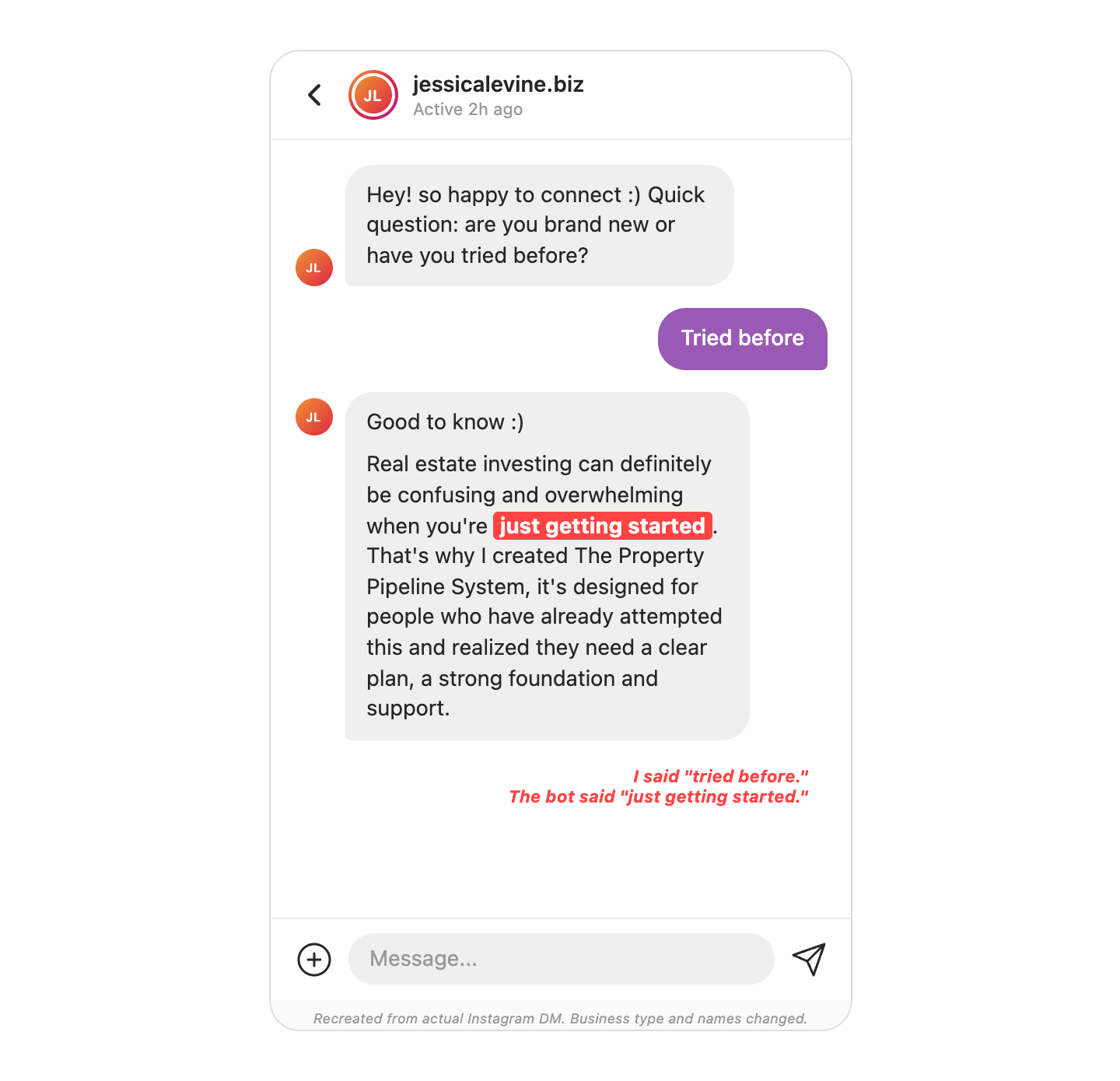
I said “tried before.” The bot said “just getting started.”
The automation asked me a question it never used the answer to.
Today, I’m talking about the lazy automation, when your ManyChat flow asks a qualifying question and then delivers the same canned response no matter what the prospect selects:
→ The 3 fingerprints that tell you your automation is running theater instead of qualification
→ Why your setter is inheriting cold threads that were warm 10 seconds ago
→ The fix that takes 15 minutes in ManyChat and changes every thread your team touches
Let’s get into it...
🔟 Mistake #10: Your automation asked a question it didn’t use the answer to
The bot gave me two choices: “brand new” and “tried before.”
That’s a qualifying question.
It’s supposed to route the conversation based on what I said.
But the next message was the same regardless of which button I tapped.
One flow path. One canned response. The question was theater.
And the response didn’t just ignore my answer. It contradicted it. I told the system I had experience. The system told me I was just getting started.
The bot told on itself.
But, the prospect doesn’t blame the bot. They blame the person behind it.
In a founder-led agency, that’s the founder. The founder approved this automation, or never checked it. The VA or marketing coordinator may have built it, but the founder owns the revenue it’s losing.
And the setter? The setter picks up the thread after the automation runs. They walk into a conversation where the prospect already feels unheard. The thread was warm 10 seconds ago. Now it’s cold. And the setter gets blamed for a problem that was created upstream.
Your automation poisoned the thread before the setter ever touched it.
The 3 fingerprints of a lazy automation
Here’s how to diagnose whether your ManyChat flow is qualifying or performing.
1️⃣ Fingerprint 1: The Contradiction Check.
Read the follow-up message your automation sends after the prospect makes a selection. Does the language match or contradict what they chose?
“Tried before” followed by “when you’re just getting started” = contradiction.
“Tried before” followed by “most people who’ve already been through a round or two say the same thing” = match.
If the language contradicts the selection, the bot told on itself.
2️⃣ Fingerprint 2: The Generic Follow-Up Test.
Would the follow-up message have been word-for-word identical regardless of which option the prospect selected?
Copy the message. Paste it next to the other option’s response. If they’re the same message, or close enough that a prospect wouldn’t notice the difference, the question was theater.
The automation collected a data point it never used.
3️⃣ Fingerprint 3: The Setter Handoff Score.
When the human setter picks up the thread, do they know what the prospect selected?
Does the automation pass the self-selection forward? Or does the setter walk into a blank thread with no context?
A good automation gives the setter a lead-in. “This person said ‘tried before,’ so the conversation starts from experience, not from scratch.”
A lazy automation gives the setter nothing. The setter has to ask the same question the prospect already answered. The prospect thinks, “I literally just told you this.”
The fix
ManyChat lets you attach a separate sub-automation to each button.
When the prospect taps “tried before,” they trigger one sub-automation. When they tap “brand new,” they trigger a different one.
Each sub-automation delivers the same asset. But the message that delivers it is written differently.
Two buttons. Two sub-automations. Two versions of the same follow-up message.
❌ Before (one path, however the prospect answers):
“When you’re just getting started, it can feel overwhelming. But it doesn’t have to be. That’s why I built The Property Pipeline System...”
✅ After (”tried before” path):
“Good to know. Most people who’ve already been through a round or two say the same thing... the process wasn’t the problem, the plan was. That’s exactly what The Property Pipeline System is built for.”
✅ After (”brand new” path):
“Good to know. Getting started can feel overwhelming, but it doesn’t have to be. That’s why I built The Property Pipeline System...”
Same asset delivered. Different framing. The prospect feels heard. And the setter inherits a warm thread with context instead of a dead one with nothing.
Here’s how to fix it:
1️⃣ Open your ManyChat flow and find every qualifying question.
Any button, any quick reply, any multiple-choice prompt. List them.
2️⃣ For each question, build a separate sub-automation for each option.
Don’t just change one word in the follow-up. Write the first sentence of each branch so it echoes the prospect’s selection back to them.
“Tried before” should hear language that acknowledges experience.
“Brand new” should hear language that acknowledges starting fresh.
The rest of the message can converge.
3️⃣ Tag the prospect’s selection and pass it to the setter.
Use ManyChat custom fields or tags so when the human picks up the thread, they can see “this person said ‘tried before’” without scrolling back through the automation log.
The setter should know whether they’re talking to someone with experience or someone starting from zero before they type a word.
That’s it.
Here’s what you learned today:
→ If your automation asks a qualifying question but delivers the same response regardless of the answer, the question is theater
→ The prospect doesn’t blame the bot. They blame the person behind it. And the setter gets blamed for a thread that was poisoned upstream
→ The fix is sub-automations that branch based on selection, echo the prospect’s answer, and pass context to the human setter
Go check your own ManyChat flows right now. Pick a button in your automation. Tap it. Read the next message. Then go back and tap the other button.
Did the message change? Or did you get the same thing regardless?
If you got the same thing, your automation is running theater. And every thread it touches starts colder than it should.
Over the next 31 days, I’m walking you through:
→ How to audit the rest of your sequence for the same “ask but don’t use” pattern
→ What happens when your CRM tags prospects based on automation answers nobody reads
→ The follow-up message that makes the prospect forget the last three were ignored
→ Why asking the same yes/no question three different ways kills the thread
→ The single-word “[FIRST NAME]?” desperation message and what to send instead
→ How to build a sequence where every message earns the next one
→ The breakup message that actually gets replies
→ What a rebuilt 7-message sequence looks like end to end
What we’ve already covered:
→ Day 1: How to write a DM opener that doesn’t sound like every other DM opener. The sender-first opener and why “Hey [Name], saw your profile” is dead.
→ Day 2: How to personalize without sounding like a merge tag. The lazy line every prospect has seen 200 times this month.
→ Day 3: How to ask a question your prospect actually wants to answer. The bait-question test.
→ Day 4: How to pass the IKEA test on every message in your sequence. One instruction per message, every time.
→ Day 5: How to stop your prospect from ghosting after M1. The pacing pattern that earns a second touch.
→ Day 6: How to write an M2 that doesn’t look like a follow-up. The reopener that pays off the opening message.
→ Day 7: How to stop booking calls that don’t close. Qualifying inside the DM before the calendar link goes out.
→ Day 8: How to spot the question that wasn’t a question. Spencer’s opening message and the bait under the curiosity.
→ Day 9: The Frame Flip. When “teach me” becomes “let me teach you” in one message.
I packaged today’s diagnostic as a standalone tool:
The Lazy Automation Diagnostic
It audits any ManyChat or IG automation flow for the 3 fingerprints.
Paste your automation’s qualifying questions and follow-up messages.
The diagnostic catches contradictions, flags generic follow-ups, and scores your setter handoff.
But it doesn’t stop at the audit.
It also includes pre-built automation templates for 5 agency types, each with:
→ qualifying questions
→ sub-automation copy
→ tags, and setter handoff briefs
Written for that niche.
Pick your agency type, hand the template to your VA, and the fix is live by end of day.
Paid 8am In Atlanta subscribers: use code included with today’s mega-prompt at checkout for $20 off.
Not a paid subscriber yet? Upgrade your subscription to get $20 off this diagnostic (and every tool I drop in the May Series).
